


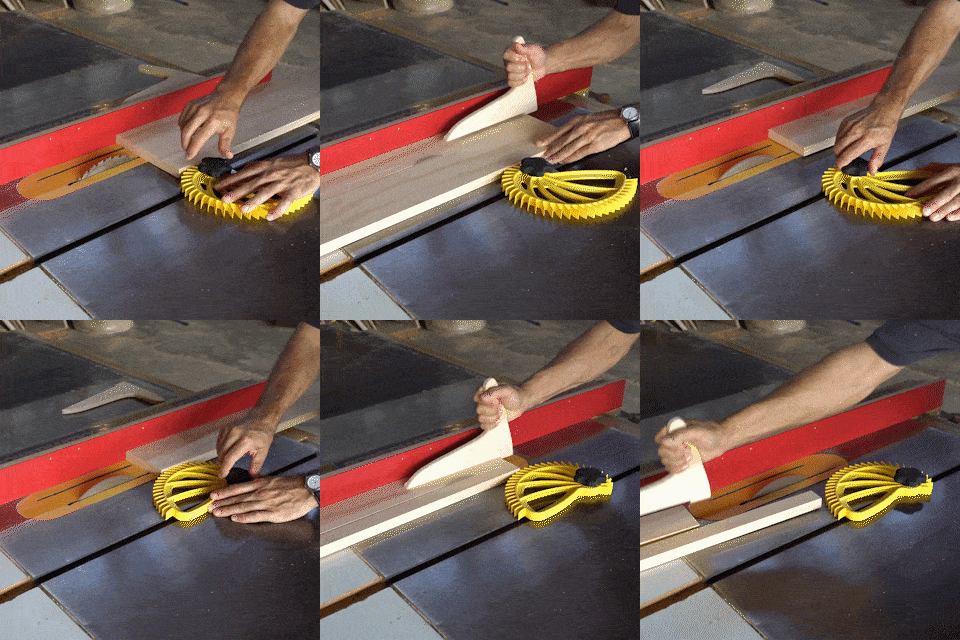
The blade is spinning and your fingers are barely a hand's width away.
Anyone who has stood at a table saw and felt their fingertips creeping closer to the blade with every cut knows exactly how unsettling that moment is. The ProCut Assist Push Block holds your workpiece firmly against the fence and guides it cleanly through the blade — while your hands stay at a safe distance throughout. The result is straight, accurate cuts without having to repeat them, and without the constant tension of working too close to a moving blade.

Benefits
- No more drifting or slipping: The workpiece is pressed firmly against the fence and held in position the entire time, so you never have to stop mid-cut to realign or redo the pass.
- No fiddly setup between cuts: The one-button adjustment system takes seconds to reset, so you get straight back to cutting without losing time on repositioning or recalibration.
- No more working tense and distracted: Because your hands stay consistently away from the blade, you no longer have to split your focus between safety and accuracy — you can concentrate entirely on the cut itself.
Specifications
- Variants: Locator Block, Push Block, or Complete Set (Locator Block + Push Block)
- Compatible with: Table saw, bandsaw, router table
- Handle design: Ergonomic grip with non-slip guidance
- Adjustment system: One-button mechanism for rapid resizing
- Suitable for: Beginners and experienced woodworkers alike

How to Use
- Position: Slide the block up to the edge of the workpiece and set the guide width using the adjustment button.
- Guide: Press the workpiece steadily against the fence with the block and feed it through the saw with a smooth, controlled movement.
- Complete the cut: Keep the block in place until the workpiece has fully cleared the blade before releasing, to prevent any kickback.
Pro Tip: Place the Locator Block on the opposite side of the Push Block as a fixed stop — this keeps the workpiece perfectly on line even during long rip cuts without any mid-cut correction.