


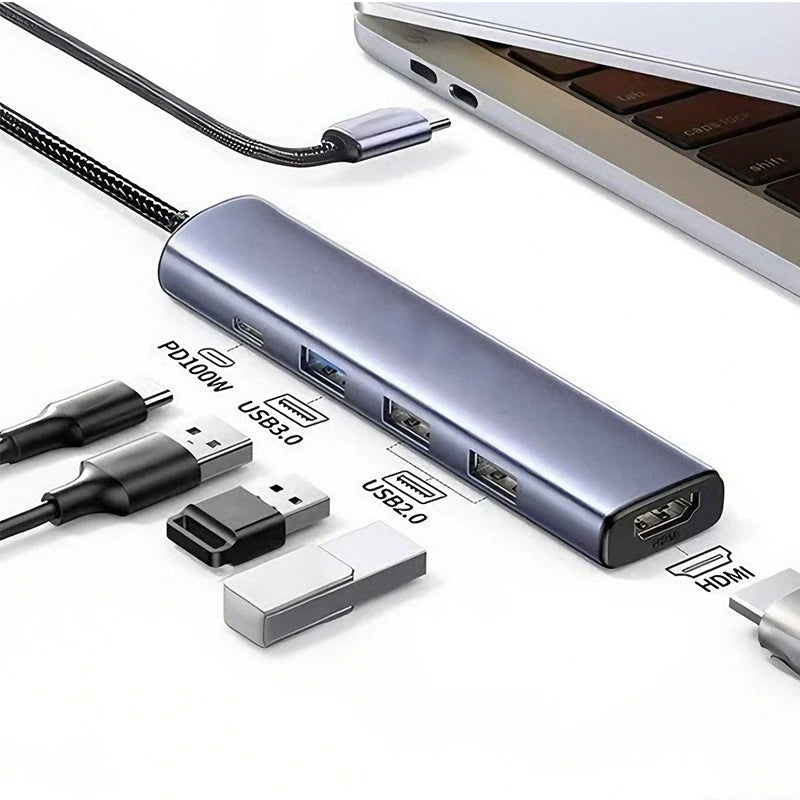
Too few ports on your laptop and the whole work comes to a halt.
Anyone who has to make do with only one USB-C port at the desk or on the go knows the problem: external monitors, USB devices, and charging cables all compete for the same slot. The 5-in-1 USB-C Hub solves this by turning a single USB-C port into five simultaneously usable ports – including 4K HDMI output and 100W Power Delivery. The result: a tidy workspace and no more cable clutter.

Advantages
- No more cable chaos on the desk: Instead of multiple separate adapters, a single compact device provides all important connections simultaneously – keeping the desk tidy.
- No long waiting times during file transfers: Thanks to USB 3.0 with up to 5 Gbps, large videos and folders transfer to external drives in seconds – no more standstills while working.
- No empty battery during intensive use: The integrated 100W Power Delivery charges the laptop while all other ports are active – no need to monitor the battery level anymore.

Specifications
- Connection: USB Type-C (Input)
- Outputs: 1x HDMI (4K@30Hz), 1x USB 3.0 (up to 5 Gbps), 2x USB 2.0 (up to 480 Mbps), 1x USB-C PD (up to 100W)
- Housing: Aluminum alloy with braided cable
- Color: Gray
- Scope of delivery: 1x 5-in-1 USB-C Hub

Usage
- Connect: Plug the hub into the laptop’s USB-C port – no drivers required.
- Connect monitor: Connect HDMI cable between hub and external screen or projector for 4K resolution at 30Hz.
- Plug in devices: Connect USB devices and charging cables simultaneously into the remaining ports – everything runs in parallel without interruption.
Pro tip: During data transfer or screen mirroring, do not unplug or plug in the PD charging cable – this keeps the connection stable and prevents short interruptions.